27 May, 2009

a week with KDE on Windows

I thought it's time for a little update on my experience with my new Vaio Laptop. Running Vista and KDE 4.2.3. First about the hardware. It's serously good. Right now I'm typing with the brightness on it's lowest level, yet it's almost too bright. I've even used it in the full sun already, and if the black casing wouldn't have gotten so hot with the sun burning on it I might have stayed longer ;-)

Secondly, I'm typing in the dark. So I can't see the keyboard, yet I didn't make any mistakes with that smiley above. Maybe I'm a great touchtypist, or easily impressed - but I'd rather think this keyboard is just amazingly intuitive. Oh, and logging in by swiping a finger - well, let's just say any geek would appreciate that.

Then about KDE. Getting it installed was a little challenge - the installer still needs a little work. Well, it didn't get one of the dependencies, and many of the servers didn't work or were outdated, the installer itself works just fine. If only it would pick servers automatically...


I've installed an Amarok nightly, and beta3 of KOffice. I must confess I miss plasma and KRunner (at least plasma is there but it's integration with windows is... missing...) but Explorer and I are getting along reasonably well. That app has some seriously powerful features, yet it's reasonably easy to use. The windows menu however is horrible (how can people complain about Kickoff if this is the standard for most computer users?). Luckily you can use it as KRunner - hit the 'Win' key, type and hit enter. Mostly works. As soon as MS fixes the windowmanagement (or lack thereof) I would probably consider Vista 'ready for casual use' ;-)

Anyway. So what KDE applications are a great addition to the MS desktop? I'd start with Okular. Adobe's pdf reader is an abomination, and Okular feels like a breath of fresh air. Kolourpaint is surprisingly similair to MS paint, except that it's not THAT anorexic in the feature department. Perfect replacement. And I often run Kopete, Konversation and Choqok in the communication department. Gwenview is a fine replacement for the normal Vista picture viewer.

As I said, Explorer is rather OK as a filemanager, and Dolphin, lacking some Vista integration, doesn't make a lot of sense as replacement right now. And imho nothing beats Chrome in the performance department so that's what I use to browse the web.

Unfortunately Beta3 of KSpread 2.0 doesn't work with most of my ODF presentations. I know the RC on linux does so I guess a later version will do better - and the final release is soon. KWord is fine for casual texts, and it can do more advanced stuff as well - but the interoperability with OpenOffice isn't great and some things are missing or work rather uncomfortable so I wouldn't recommend removing OO yet.

KTorrent works, and downloads just fine. Digikam - well, beyond starting it up I haven't used it yet. Thanks to a broken monitor I'm stuck to this laptop so I use it a bit more than usual but I still don't feel like working on it like I would on my normal PC...

All in all, KDE on windows works pretty well. It is an alien environment for the KDE applications, which sometimes shows, but generally they do a fine job. Performance is comparable to native windows apps and stability is reasonable. Personally, I still find windows a bit uneasy so I find it hard to judge how good it all really is, but with the KDE apps it feels a bit more at home for me so I like it ;-)

14 May, 2009

New lappie!

In the last weeks I've been pondering the aquisition of a new laptop. It arrived tuesday - happy me. Instead of throwing linux on it without even a single boot in Vista, I decided to try MS' offering. If it works well enough, there is no reason not to run and demo KDE on Windows, right? After all, I paid for it. Now I had a hard time not turning this blog in one big rant about Vista (guess what - lots of things I disliked...) so please forgive me for a few small slips...
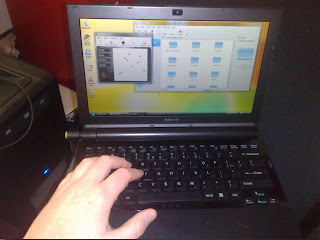


The laptop I bought, a Sony Vaio VGN-TZ31something is very nice. 1.2 kilogram, 11.1" 1366x768 screen, 2 gb ram and dualcore 1.2 ghz intel C2D. And a dvd drive (I won't ever need). Not as sturdy as reviews said it would be - I shiver at the thought of buying my second choice, a Toshiba 790 gram laptop with similair hardware specs. That thing was described as 'flimsy'. Well, if this Vaio is 'rock solid', the Toshiba must be made out of paper. The screen on the Vaio, however, is as excellent as the reviews say - crisp, bright. Beautiful. Sorry for the bad camera used for the pic above ;-)

It took a few hours for the preinstalled laptop to actually boot into an usable Vista installation. And you have to stay close to it as it'll ask you to click 'OK' buttons a few times. Later that day I allowed Vista to install 57 updates - which took all night. I guess I should blame the slow (4200rpm) harddrive, but even then, it seems excessive to me.

Once Vista was finally working, I had a look around. The mix of widgets in different applications is a bit unsettling (and people complain about GTK and Qt being inconsistent?) but some things really look good. The copy dialog looks nice, for example, and Windows Photo Gallery, while not as powerful as gwenview, looks nice. And I do like the window effects a lot. The way applications slide away when you close them and how minimizing is animated is just subtle and silky smooth even on this hardware. The animations in applications can be very nice too - sadly it often doesn't really fit with the other contents.

And, as the reviews promised, the Vista loaded on it is full of crap. That is, it has a million smaller and larger tools installed which (according to the reviews) slows the system down to a crawl. Well, it is hard to say for sure if it's true - I removed a lot of it and it's still slow in starting up apps. Once the app runs it works reasonably fast, and graphical performance is much better than linux. It is relatively easy to get the mousecursor to stutter in linux, or to have moving windows stutter. Not so in Windows, you notice the graphical stuff clearly has a high priority. I hope the current architectural changes in the graphical stack of FOSS can bring it up to the level of Windows, but that'll definately take a while.

Once you start removing and installing software you notice the archaic software management system (or, mostly, lack there-of). Linux users are used to just selecting what software they want to add and remove and clicking 'OK'- and the installation and removal of the software proceeds without any questions. Not so on Windows - it takes a long time to remove things like the MS Office 2007 Demo. Not just because the individual uninstallation procedure takes about an hour (including some silly questions), but also because it is split into 5 or 6 parts you each have to select and uninstall sequentially. So all in all, it took me 2 days to get to the important next part.

Installing KDE. After downloading and starting the installer & following the steps - it didn't work. Starting binaries gave a weird error which, according to the intarwebz was tracable to a missing library. Just started the installer again with the package manager and installed pretty much everything I could find and running windows update after that did the trick. No idea if it was the windows update or something I installed from the installer - but it works. Yes, truly a "close your eyes, point your gun somewhere in the direction of the target and just keep pulling the trigger". Works for me, YMMV.


After installing the apps I changed the theme to Oxygen. It looks much nicer, and fits reasonably well with the Vista look.

So what is the result? Not everything works. Plasma especially lacks most plasmoids (no taskbar, no systray). The applications didn't show up in the menu initially but this has been fixed after a new installation - I do miss krunner, however, as it doesn't work on Vista. Starting apps via the default Vista menu is inconvenient to say the least. I even prefer kickoff. The main reason for that is that Vista doesn't categorize applications, they are all there at once. I shiver at the thought of having installed even half as many apps as I have installed on my linux box... So I made a shortcut to the KDE applications folder on the desktop to work around that menu mess.

Once started, most applications work smooth and I encountered few crashes. Well, Dolphin sometimes creates crashing KIOslave processes on using previews.
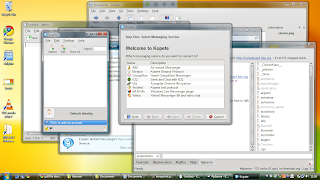


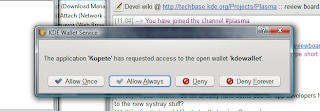
The first things I started to use were Konversation and Kopete. Excellent apps, work perfectly fine. Konqi is OK, but I prefer Google Chrome - that thing is fast! Unfortunately I couldn't find Dragonplayer. The default Windows Media Player couldn't play anything, VLC however is perfect. I do notice sometimes apps refuse to write data, so you can't save files - annoying for sure. Hope this gets fixed... A pleasant surprise was KWallet integration. Somehow I didn't expect this to work properly, but it does perfectly fine. No remembering passwords, lovely!


Now see how long I tolerate the slugish startup times (both in booting, resuming-from-sleep and app startup) and the lack of proper integration in the underlying OS. And bad windowmanagement. And how Vista insists on showing the SD Drive and Memory Stick drive even while they're empty ;-)

Yeah, it's the small things which can be so annoying... Thinking about it, it might actually be a strength of the Free Software development model. The 'scratch your own itch' rule seems to make sure annoying bugs get fixed swiftly. Larger stuff and big features tends to go slower, as does usability work - I see several things Vista is clearly ahead in. But overall, I prefer my linux box by far.

08 May, 2009

OpenSuse Community Week

If you've wanted to contribute to FOSS but have no clue how - there's the OpenSuse Community Week for ya. The idea is not only to do something useful right there and then, but also to help others get involved. Throw some community building in the mix and you have the typical combination of fun, learning & being productive which is so typical of a Free Software community.

Of course there will be KDE ppl there, check the KDE schedule. Rob Scheepmaker, Marco Martin and Kevin Krammer will be there - and there is plenty of room for more so sign up if you think you can help others to get involved! I'm contemplating to join the Marketing Schedule - depends on how much time I have and whether joining the KDE schedule seems more appropriate ;-)

Talking about time, I sometimes wonder if I take this workaholic thing too far... I was home from work last night at 20:45 and up and working on KDE promo stuff at 5:00 this morning. Aaah well, I'm having fun, and I don't do that every day (I wish I had the stamina...).

22 March, 2009

usability in KDE

I'm not a usability dude, and following the usability mailinglist has taught me it's an art I shouldn't get too involved in. Unfortunately, while we have a few hard-working usability experts in KDE, they can't thoroughly check each and every application.

Luckily, we have users joining KDE from a platform known for a strong focus on usability. I'm not saying we should copy the approach others have chosen for usability. KDE is different and has different ideas about usability - enough has been said about that. However, advice never hurts - and there are several points in this blogpost that make sense. The contents have been discussed a bit on the usability mailinglist, and as I said - several points make sense, others might not. Yet Sebastian's blog might be helpful for somebody who wants to improve some obvious areas in KDE in terms of usability, so I thought it'd be good if ppl read it.

Personally I think such articles (I can hardly call it the usual blog) can help in improving KDE, as they point to issues and solutions developers might not have been aware off. Peter Penz (of Dolphin fame) has read it and implemented at least one suggestion, while several others were already done in KDE 4.3 branch. Who's next?

13 March, 2009

Requiem

Today, I was going to write a rather sarcastic and hopefully funny story about silly responses my blog a few days ago. It would have involved hamsters forcing KDE developers to write code. Including proof, in the form of images with KDE developers and my own little dwarf hamster.

Unfortunately, there won't be such a story. Somewhere between last night and coming home after work today, Thomas, my beloved dwarfhamster, died. This is a sad day.

No more watching him run in his weel. Or through my room, or on my lap. No more feeding him nor giving him silly things to play with. No watching him shred paper into little pieces. I will even miss cleaning his cage :(

Life goes on, but I'll miss my little hamster...

10 March, 2009

Plasma dev team rocks

Yesterday I updated KDE SVN. So, I have the latest dev stuff on my box again. Upon logging in, I was greeted by the new look of plasma.

First of all, congrats to the artists. The AIR theme (of course a work in progress) looks bloody good.


Next I want to express my respect for the coders. I am very happy with the zooming capabilities of plasma - which allows you to create a bunch of desktops (called activities). Very nice considering the room you would need for all the useful plasmoids. There's a blackboard now, the microblog is kick ass, and there is that desktop assistent thing which doesn't make much sense to me... I just would love to be able to connect virtual desktops to activities!

Third - Qt 4.5 rocks. The performance improvements are very noticable, nice work!

Fourth, interesting article on Techrepublic (a nice "ten reasons why Gnome is better than KDE", I'm not even going to link to it). I was surprised with a new uninformed rant/opinionated piece/whatever about KDE 4. I though we were getting past all that.

Arguments were same-old, same-old. Like "KDE developers don't listen to users". Clearly, the plasma developers focussed entirely on fun stuff and didn't do anything in the last 6 months to get plasma on feature parity with KDE 3.5.x. Oh, wait....

Funny to see what he complains about. KDE 4 is like Vista. Hmmm, what about all the complaints about either Gnomification or Macification of KDE? If we simultaniously copy Mac, Gnome and Vista, what does that make us?
Funny to see it's mostly about what KDE does wrong, not about what Gnome does right. What does that say about both projects?
Funny to see how KDE 3.5 these days is used as a prime example of a 'perfect' desktop, a great and usable piece of software. I distinctively remember all the complaints about how cluttered and busy it was, how unprofessional it looked. Now, suddenly, while we are giving more attention to both usability and innovative interface elements, KDE 3.x is the best desktop FOSS has to offer. Hmmmm. He actually complains how cluttered KDE 4 is... Not saying there is nothing to improve, but worse than 3.x?

I think I don't have to talk about his specific points, most are either silly, uninformed, stupid, or a random combination of those. I guess I should just point to this pic wade made...